You know the feeling. You open Search Console on Monday, check a Meta page on Tuesday, export CRM leads on Wednesday, and by Friday you're staring at five tabs trying to remember which number explains the drop in enquiries. That's the problem seo dashboard software is supposed to solve, not generate another pretty report that sits unopened in a browser tab.
French SMBs don't have time for tool sprawl, and they certainly don't have time for dashboards that look impressive in a demo but don't answer commercial questions. If your business depends on discovery, whether through search, social, directories, or AI recommendations, the right dashboard should tell you what changed, why it changed, and whether it affected leads. If it can't do that, it's decoration.
| Dashboard type | What it gives you | What it usually misses | Best fit |
|---|---|---|---|
| All-in-one SEO suite | Rankings, traffic, technical checks, scheduled reports | Weak local context, limited AI visibility | Small teams that want standard SEO reporting |
| Enterprise modular stack | Deep integrations, CRM linkage, custom governance | Heavy setup, higher maintenance, slower adoption | Larger organisations with analysts and ops support |
| GEO-first platform | SEO plus AI recommendation tracking and visibility | Narrower ecosystem than legacy suites | SMBs that care about both search and AI discovery |
The Five-Tab Problem Every SMB Faces
A bakery owner does not need another dashboard lecture. They need to know why phone calls slowed, why Instagram DMs picked up, and whether the drop came from Google Business Profile, search visibility, or a site issue that sent people elsewhere.
That is the five-tab problem. Search Console shows impressions, social shows engagement, CRM exports show leads, and speed tests explain part of the drop, but none of them answers the business question on its own. Every switch costs time, and every gap makes the diagnosis sloppier.
France's 2024 France Num barometer shows why this matters, 85% of French businesses used at least one online-visibility solution, and 56% said at least 5% of customers came from the internet (France Num barometer data). French SMBs already depend on digital discovery, so fragmented reporting is a bad habit, not a harmless inconvenience.
Practical rule: if you need more than one tab to answer “what changed and did it matter?”, your reporting setup is too fragmented.
What the software replaces
A serious dashboard replaces the weekly scavenger hunt with one working view. Rankings, traffic, technical health, and lead signals sit in the same place, so the owner can see the connection between visibility and demand without stitching exports together by hand.
For a plumber, a florist, or a multi-location retailer, that matters because local demand moves fast. A spike in branded searches, a drop in calls, or a technical issue on a key page needs a quick read, not a half-day of reconciling reports.
That is why I tell clients to compare SEO dashboard software before they sign anything. The right comparison is simple, who reduces the tab mess and gives a non-analyst a clear answer. If a tool looks good but still forces manual cross-checking, it will waste time from the first week.
What an SEO Dashboard Does
A good SEO dashboard answers three questions on one screen: what changed, why it changed, and whether that change helped or hurt demand. That matters for French SMBs that do not have time for manual reporting and do not need a prettier spreadsheet pretending to be strategy.
The useful part is practical. It tracks visibility through rankings, impressions, and share of voice. It shows performance through indexation, page speed, and technical problems. It connects that activity to commercial outcomes like leads, bookings, or sales. Many tools claim that last step. Few make it clear enough for an owner to act on without interpretation.
For French SMBs, there is another reality that many comparisons skip. A lot of businesses are discovered through social channels, local search, or referrals before anyone ever lands on a polished website. A dashboard should reflect that path, not only track blue-link rankings. It also has to leave room for the AI visibility layer, because buyers now discover brands inside AI answers as well as search results.
A dashboard also has to respect the constraints that come with French operations. If you need to get SEO support for your website, the tool should tell you which pages, queries, and conversions deserve attention first. Support without measurement just creates busywork. Measurement without action does the same.
If you want a concrete checklist for what belongs on the screen, use this SEO analytics dashboard guide as the benchmark. A vendor that cannot explain those basics is selling decoration, not decision support.
The Five Criteria That Actually Matter
Most comparisons drown you in checkbox noise. Don't fall for it. A French SMB should judge seo dashboard software on five things only, because those are the things that determine whether the tool gets used after the first week.
1. Data sources and freshness
If the dashboard doesn't connect cleanly to Search Console, analytics, rankings, and CRM data, you'll still be exporting files by hand. Freshness matters too, because stale data creates false confidence. A dashboard that updates slowly is worse than no dashboard at all when a landing page tanks or a product page starts slipping.
2. French-market coverage
You need Google.fr visibility, local SERP context, French-language keyword groups, and city or département views where relevant. A generic global dashboard often misses the nuance that matters in France, especially for local businesses and service firms. If the vendor can't show you how it handles French market structures, move on.
3. Commercial attribution depth
Rankings are not the outcome. Leads, bookings, calls, and sales are the outcome. The tool should show whether search activity contributes to those outcomes, and it should separate branded demand from non-branded demand so you can see what SEO is creating.
4. Time to first insight
This matters more than customisation for most SMBs. INSEE's 2024 ICT survey found only 6% analysed data from websites, while 21% analysed transaction data and 14% analysed customer-profile data (INSEE survey data). That gap tells you the truth, most French firms are not running elaborate analytics programmes, so the tool has to work out of the box.
5. Total cost of ownership
Look beyond the monthly subscription. Count setup time, integration effort, training, and the cost of mistakes caused by bad data. A low sticker price can still be expensive if nobody trusts the dashboard enough to use it.
If a tool needs a consultant just to become legible, it's not SMB software, it's a project.
I apply those five criteria in the comparison that follows, because they filter out the tools that look strong in sales demos but collapse in weekly use.
Three Dashboard Archetypes Compared
The market is easier to understand when you group tools by how they behave, not by how they market themselves. For French SMBs, there are three serious archetypes, and each one solves a different problem.
| Archetype | Typical monthly cost | Best for | Main weakness |
|---|---|---|---|
| Legacy all-in-one suite | Lower to mid-range | Small teams that want familiar SEO reporting | Often shallow on local nuance and AI visibility |
| Enterprise-grade modular stack | Mid to high range | Larger firms with analysts, CRM processes, and governance needs | Heavy setup and ongoing admin |
| GEO-first platform | Mid-range, sometimes with lightweight onboarding | SMBs that want SEO plus AI recommendation tracking | Smaller ecosystem than legacy suites |
Legacy all-in-one suites
These are the familiar names. They usually cover rankings, audits, backlinks, and scheduled reporting well enough for teams that want the standard view. The weakness is that they often stop where SMB reality starts, local discovery, social signals, and commercial outcomes across multiple surfaces.
Enterprise-grade modular stacks
These are the tools for teams that can afford a proper data owner. They connect SEO to CRM, custom events, and internal governance, which is valuable if you've got multiple markets or a serious pipeline model. The downside is obvious, setup time, training overhead, and the risk that nobody touches the dashboard after launch.
GEO-first platforms
These are the newer category, built for businesses that need classic SEO reporting plus AI visibility. Wispra sits here because it tracks recommendations from AI search engines alongside conventional discovery, which is a real operational difference for SMBs trying to understand new demand sources. If you're trying to find MCP servers for Google data, that's a separate technical question, but it doesn't replace the dashboard layer.
For a broader look at this new category, see the AI SEO and GEO tools guide. The point isn't that every SMB needs a GEO-first stack tomorrow, it's that older comparisons ignore an increasingly relevant discovery surface.
From Rankings to Revenue
A dashboard that only shows positions is a reporting tool, not a decision tool. You can admire movement all day, but if you can't trace that movement to demand, you're still guessing. The useful model is a funnel, indexed pages and impressions first, sessions and engagement next, then leads, bookings, or revenue at the bottom.
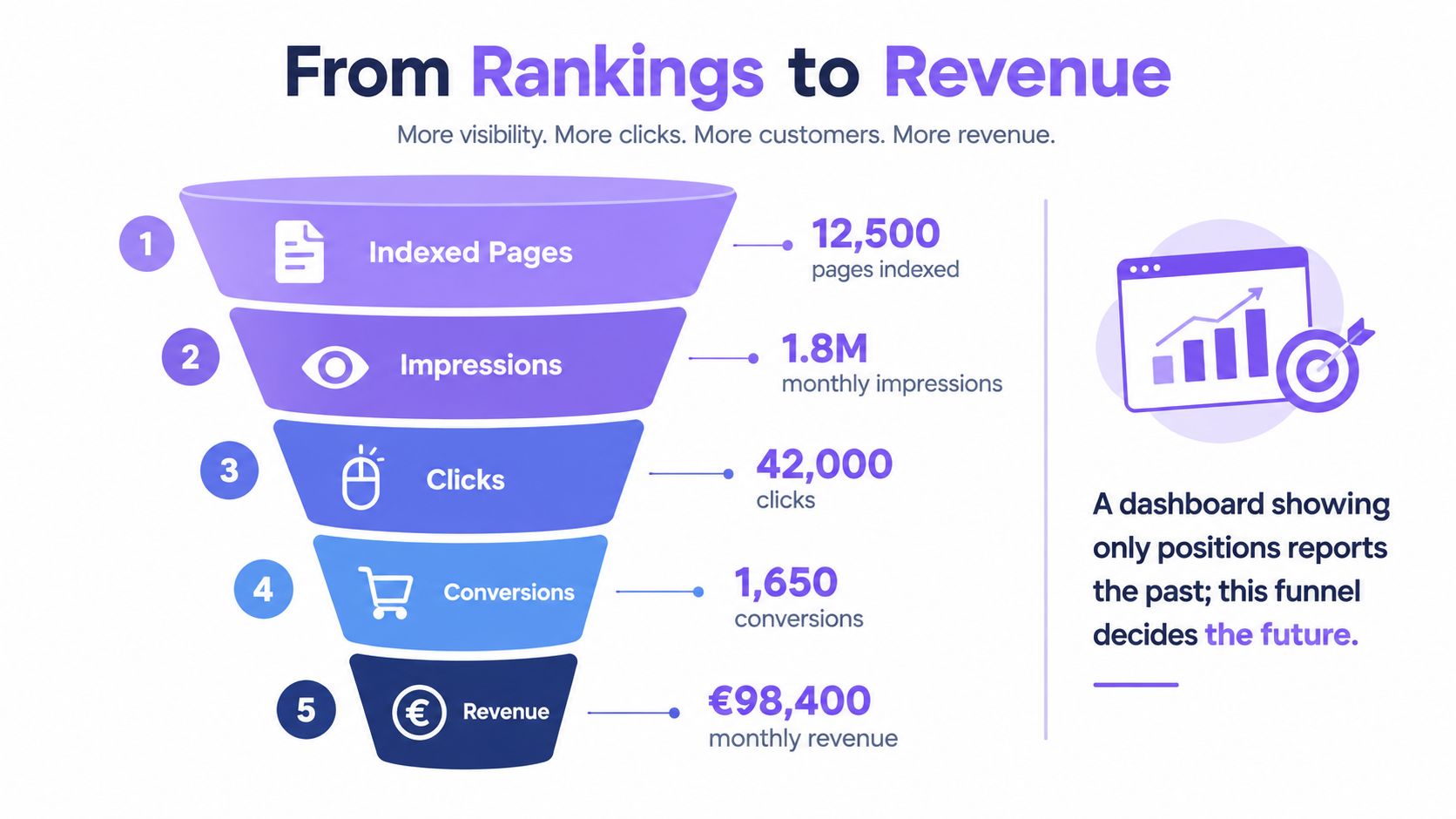
A local plumber doesn't need the same view as an e-commerce merchant. The plumber cares about contact clicks, calls, and service-area pages that generate enquiries. The merchant cares about product-page sessions, basket performance, and whether search traffic converts profitably. A real estate agent needs location pages, listing views, and lead quality, because raw traffic means little if it doesn't create property enquiries.
Technical numbers that matter
For technical reporting, don't reduce performance to a single score. A French dashboard should expose Largest Contentful Paint at ≤2.5 seconds, Interaction to Next Paint at ≤200 milliseconds, and Cumulative Layout Shift at ≤0.1. Dualmedia's benchmark also classifies Time to First Byte below 800 ms and First Contentful Paint below 1.8 seconds as good thresholds (Core Web Vitals benchmark).
That data belongs in segments, not averages. Device mix can change the picture completely, and a page template that performs well on desktop can still frustrate mobile users. A dashboard should separate URL template, device, country, and traffic volume so you can see where the problem really lives.
For a clean KPI hierarchy, the best framing is simple, visibility at the top, engagement in the middle, revenue at the bottom. You can also compare that structure with this KPI guide for SEO measurement if you want a stricter performance model.
Adding the AI Visibility Layer

AI visibility isn't a checkbox inside a normal SEO dashboard. It's a separate discovery layer, because the question isn't just whether your site ranks, it's whether AI systems recommend your business when people ask for a solution. That requires its own measurements, prompt-level presence, recommendation frequency, source citations, and relative visibility against named competitors.
France is already moving in that direction. France Num's 2025 barometer reported 26% of French businesses used AI in 2025, up from 13% in 2024, and 14% used it for information search or chatbots (France Num 2025 barometer). That doesn't mean AI replaces SEO. It means discovery is spreading across more surfaces, and the dashboard has to reflect that.
Wispra is relevant here because it uses a tracking pixel and a real-time dashboard to measure AI visibility alongside conventional performance. That matters if you're a local business, agency, or merchant trying to understand not just who visits your site, but which AI answers are surfacing your brand in the first place.
What to track
Don't overcomplicate it. Start with whether your business appears in relevant AI responses, whether competitors are cited instead of you, and whether the answer source points to your own content, directory listing, or a third-party page. Then separate that visibility from conventional search traffic so you don't mistake one channel for the other.
The right mindset is straightforward. AI visibility is an emerging discovery surface, not a replacement for search. Treat it that way, and you'll get a cleaner picture of how buyers are finding you.
The CNIL Question Most Comparisons Skip
Privacy language gets abused in this category. “Privacy-friendly” and “cookieless” sound nice, but they don't tell you whether the dashboard's measurement method fits CNIL expectations. The only question that matters is whether the data flow stays inside the consent exemption or pushes you into a different compliance regime.
CNIL guidance allows analytics without consent only when measurement is strictly limited to site performance, produces anonymous statistics, avoids combining data with other systems, and respects limits such as a 13-month cookie lifetime and 25-month data retention (CNIL guidance summary). That's a narrow lane, and a lot of dashboard features drift out of it quickly.
What pushes you over the line
Embedded pixels can be fine in some setups and risky in others, depending on what they collect and where the data goes. Cross-domain identifiers, CRM attribution, and AI-visibility tracking can also change the compliance analysis because they link behaviour across systems instead of staying limited to anonymous site measurement. If a vendor can't explain that clearly, assume the answer is no until proven otherwise.
Practical rule: ask the vendor whether the system measures anonymous performance or builds a user-level trail. That one answer separates a clean dashboard from a compliance headache.
Vendor questions that matter
- Data location: where is the data stored, and who can access it?
- Processor roles: which entity is controller, processor, or subprocessor?
- Identifier behaviour: does the system create persistent IDs across sites or apps?
- Export and deletion: can you delete data cleanly and prove it?
- Retention controls: can the platform enforce the right limits automatically?
Those questions are more useful than generic security badges. French SMBs don't need legal theatre, they need a dashboard they can use without creating avoidable risk.
Choosing the Right Dashboard for Your Profile
The best dashboard is the one your team will open every week. Not the one with the longest feature list, and not the one that looks most impressive in a procurement meeting. Match the tool to how your business discovers customers, because that is where the measurement has to live.
A simple decision matrix
| Business profile | Best fit | Why it fits |
|---|---|---|
| Local services with no website | GEO-first platform or lightweight local reporting | You need visibility across directories, AI answers, and non-website discovery before you need deep technical SEO |
| E-commerce on WooCommerce or Shopify | All-in-one suite or modular stack | Product pages, conversion tracking, and technical checks matter more here |
| Real estate agent relying on local SERPs | GEO-first platform with local reporting | Local search, branded queries, and lead tracking are the main game |
| Freelancer | Simple all-in-one suite | Low setup friction matters more than complex attribution |
| Agency managing multiple SMB clients | Modular stack or GEO-first platform | You need repeatable views, client separation, and a clean way to compare discovery channels |
If your business is website-light, the old website-first dashboard model is often the wrong starting point. That's especially true for local services and discovery-driven businesses where calls, map listings, AI answers, and social presence all matter. A GEO-first platform is often the pragmatic choice because it starts with visibility across surfaces, not just page rankings.
For businesses that already run on web traffic and transactions, the criteria shift. You want something that ties visibility to leads or sales, but not at the cost of setup complexity nobody will maintain. The dashboard should fit the team you have, not the team you wish you had.
Three rules worth keeping
Pick the dashboard your team will use weekly. Separate visibility metrics from revenue metrics so you don't confuse activity with outcomes. Treat AI visibility as its own line item, because it's a real discovery channel now, not a fad.
If you're weighing your options and want a platform built around AI visibility, French SMB workflows, and quick setup, take a look at Wispra. It gives you a practical way to measure SEO and AI discovery in one place, without forcing a website rebuild. That's the kind of dashboard that earns a place in the weekly routine instead of collecting dust.